
Azure ExpressRoute Explained: Architecture, Circuits & Routing
When organizations scale their workloads into the cloud, relying on the public internet for mission-critical data transfer can introduce latency, unpredictable performance, and security vulnerabilities. For enterprises requiring high reliability, massive speeds, and strict data privacy, Microsoft Azure offers ExpressRoute.
Azure ExpressRoute lets you create private connections between Azure datacenters and infrastructure on your premises or in a colocation environment. Because these connections do not go over the public internet, they offer higher reliability, faster speeds, and lower latencies than typical internet-based connections.
Let’s dive deep into how Azure ExpressRoute works, breaking down its architecture, circuits, and routing mechanisms.
- Core Architecture: How ExpressRoute Works
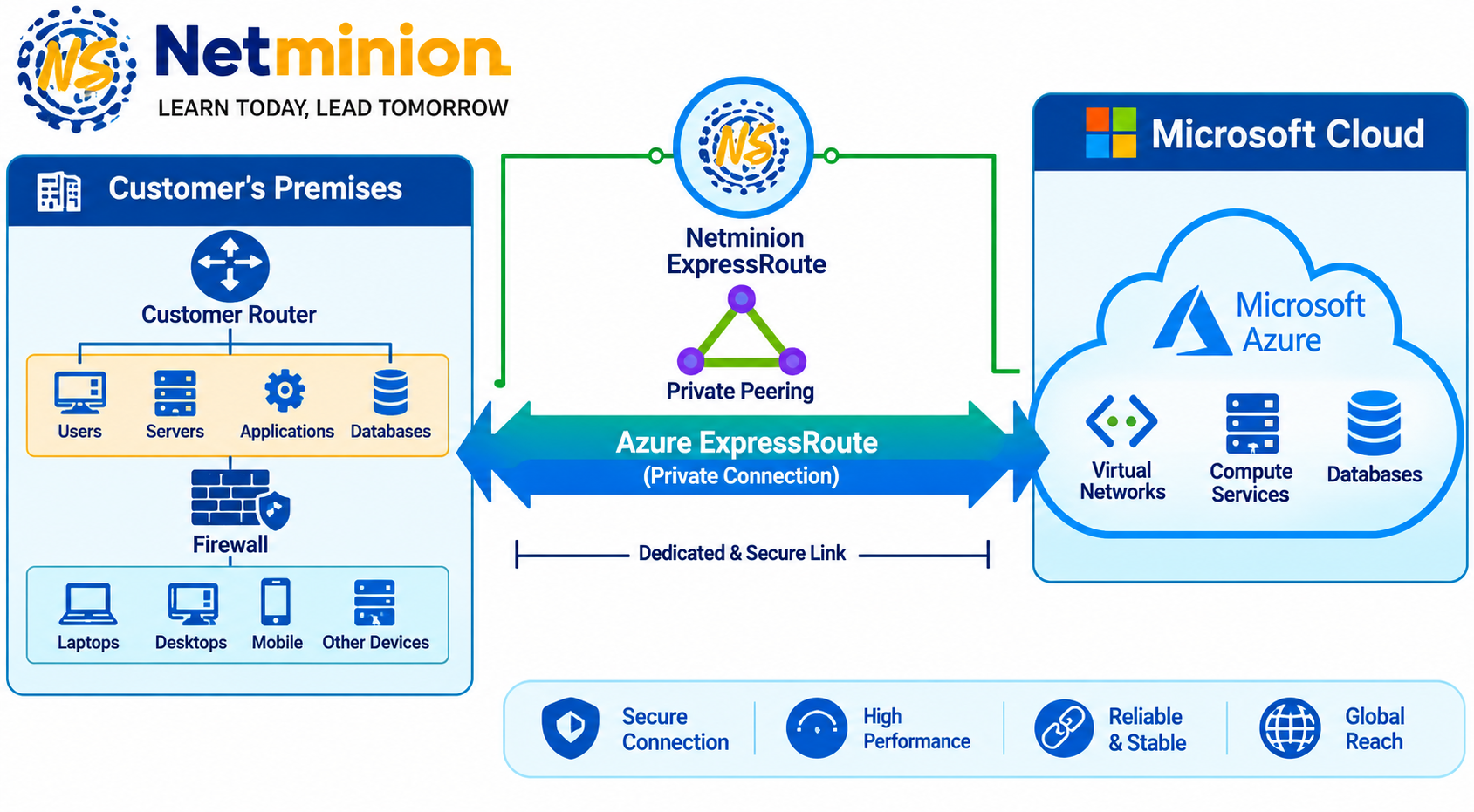
At its core, ExpressRoute acts as a reliable bridge between your on-premises network and Azure Virtual Networks (VNets). Instead of traversing the public web, your traffic travels across a secure, dedicated connection provided by a connectivity provider.
The architecture comprises several key components:
- Customer Edge (CE) Routers: The routers inside your datacenter that connect to your provider or directly to an ExpressRoute location.
- Connectivity Provider / Exchange: Telecom operators, network service providers, or cloud exchange providers (such as Equinix, AT&T, Verizon, etc.) that link your premises to an Azure ExpressRoute location.
- Microsoft Enterprise Edge (MSEE) Routers: The boundary routers managed by Microsoft that handle the entry and exit points of the Azure network.
- Azure Virtual Network (VNet) & Gateway: Your cloud environment containing an ExpressRoute Virtual Network Gateway, which securely routes traffic between Azure subnets and the MSEE routers.
- ExpressRoute Circuits: The Foundation
An ExpressRoute Circuit represents the logical connection between your on-premises infrastructure and Microsoft cloud services through a connectivity provider.
When setting up a circuit, you define several parameters:
- Service Provider: The partner facilitating the physical or virtual connection.
- Geographic Location: The Azure region where the ExpressRoute peering location is situated (e.g., US East, West Europe, Southeast Asia).
- Bandwidth: Capacities range widely based on your requirements, starting from 50 Mbps up to 10 Gbps (and higher via custom enterprise arrangements).
- SKU (Standard vs. Premium):
- Standard: Allows connectivity to VNets within the same geopolitical region as the ExpressRoute location, plus access to all Azure services (global reach is limited).
- Premium: Enables global connectivity (VNets across any Azure region can connect to the circuit) and significantly increases route limits for routing tables.
- Understanding Routing Domains: Peerings
An ExpressRoute circuit is configured with routing domains, known as peerings. Microsoft uses these peerings to separate different types of traffic. There are two primary types of peering configured on a circuit:
This is used to connect to your Azure Virtual Networks (VNets), Infrastructure as a Service (IaaS) resources (like virtual machines), and Platform as a Service (PaaS) resources deployed inside VNets.
- Traffic is completely private.
- Your on-premises network must use unique IP addresses (RFC 1918) or public IP addresses that you own, which are advertised via BGP to Microsoft.
- Microsoft Peering
This peering allows you to connect to Azure public services and Microsoft 365 services (such as Exchange Online, SharePoint Online, and Teams) without traversing the public internet.
- Traffic is routed to Microsoft’s public IP address space.
- Strict validation and compliance checks are required by Microsoft before Microsoft Peering can be enabled, especially for Microsoft 365.
- The Routing Protocol: BGP (Border Gateway Protocol)
ExpressRoute relies heavily on BGP (Border Gateway Protocol) to exchange routing information between your on-premises routers, your connectivity provider, and Microsoft’s MSEE routers.
- ASNs (Autonomous System Numbers): Both your network (or your provider’s) and Microsoft use ASNs to identify themselves on the routing path. Microsoft’s public ASN is 8075.
- Route Advertisement: Through BGP sessions established across the peerings, your routers advertise your on-premises IP prefixes to Azure, and Microsoft advertises Azure VNet IP prefixes back to your network. This ensures dynamic, automated traffic routing.
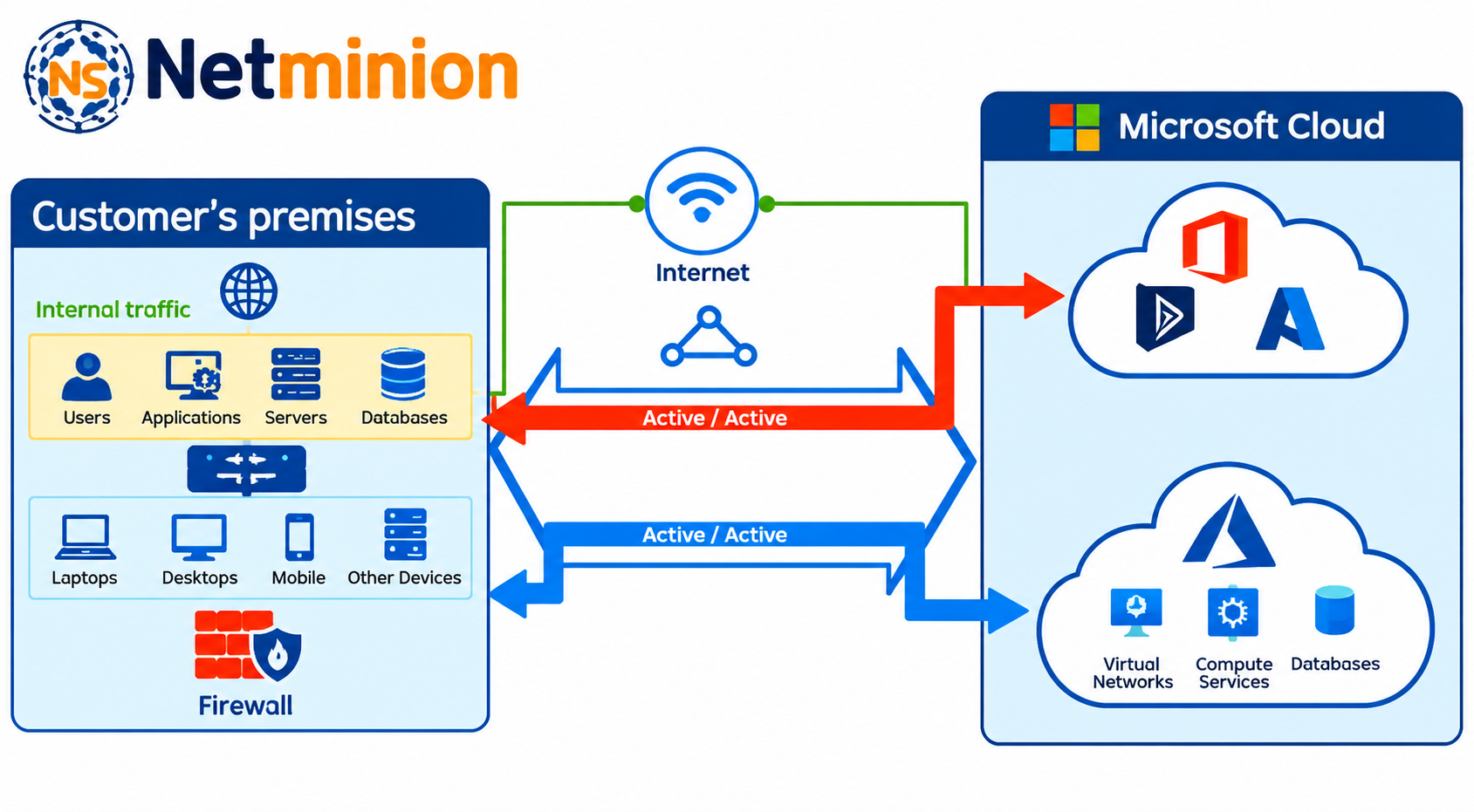
- High Availability: ExpressRoute circuits are inherently built with redundancy. Every circuit consists of two physical ports connecting to two MSEE routers in a Microsoft datacenter simultaneously, connecting to two independent routers on your side to ensure active-active high availability and automatic failover.
- ExpressRoute Direct: Taking It a Step Further
For large enterprises with massive bandwidth demands (such as global financial institutions or massive media companies) that require 100 Gbps or multiple 10 Gbps connections, Microsoft offers ExpressRoute Direct.
Instead of routing through a traditional connectivity provider, ExpressRoute Direct allows you to connect directly to Microsoft’s global network at peering locations strategically distributed across the globe. This provides raw, direct fiber-optic connections right into Microsoft’s enterprise edge routers.
Summary: When Should You Use ExpressRoute?
While Azure VPN Gateways are exceptional for standard, encrypted site-to-site connectivity over the public internet, ExpressRoute is built for scenarios demanding:
- Predictable High Throughput: Heavy data ingestion, big data analytics, or continuous backup synchronization.
- Strict Regulatory Compliance: Industries like finance, healthcare, and government that forbid certain data payloads from traveling over the public internet.
- Low Latency & High Reliability: Mission-critical enterprise applications that cannot afford jitter or packet loss.
Looking to architect a resilient, high-performance cloud networking strategy for your enterprise? Reach out to us at Netminion Solutions via info@netminion.net!
What kind of cloud connectivity model is your organization currently leveraging? Let us know your thoughts or questions below!
#netminion #netminionsolutions